Review agent suggestions and run history
Check why an agent proposed a change, approve or dismiss intended work and use run history to understand matches and failures.
Overview
Check why an agent proposed a change, approve or dismiss intended work and use run history to understand matches and failures.
Choose the right workspace
Use the everyday AI assistant to ask questions, find information and propose supported order changes. Review its cited guide or record link and check the confirmation card before approving an order action.
AI Website is a separate company workspace for creating and improving the public company website. Its saving and publishing controls have their own effects: saving changes to a published website can update it immediately.
Operational agents are ongoing automations with conditions, timing and an execution mode. Preview their matching work, review the actions and choose whether changes are simulated, require approval or run automatically where supported.
Steps
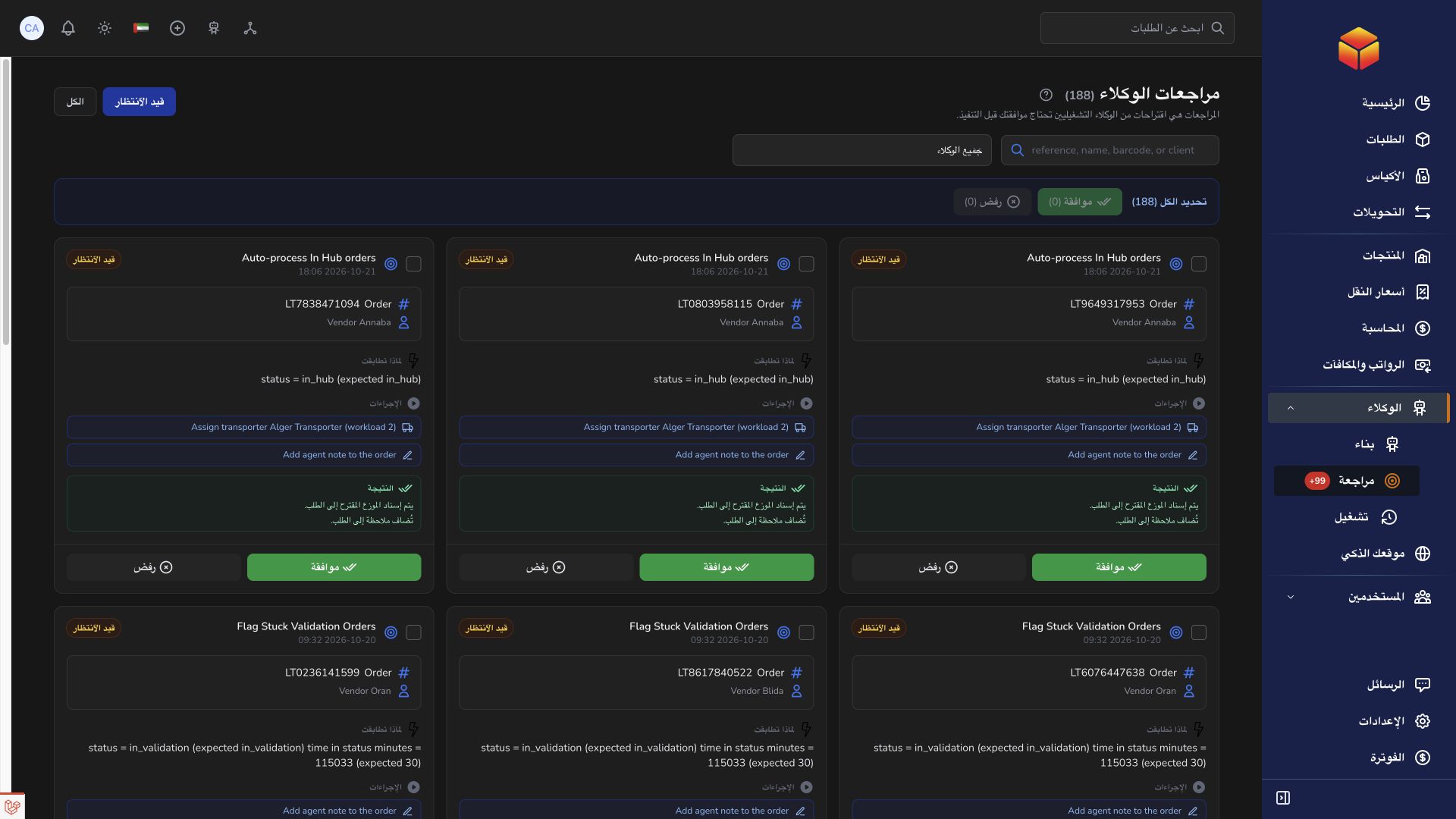
- Open Agent Reviews from the agent's actions or the available navigation. Start with Pending and filter by agent or search for the relevant subject.
- Read the subject reference, current details, matching reason and each proposed action before deciding.
- Choose Approve only when you want the suggested changes applied now, or Dismiss to reject the proposal.
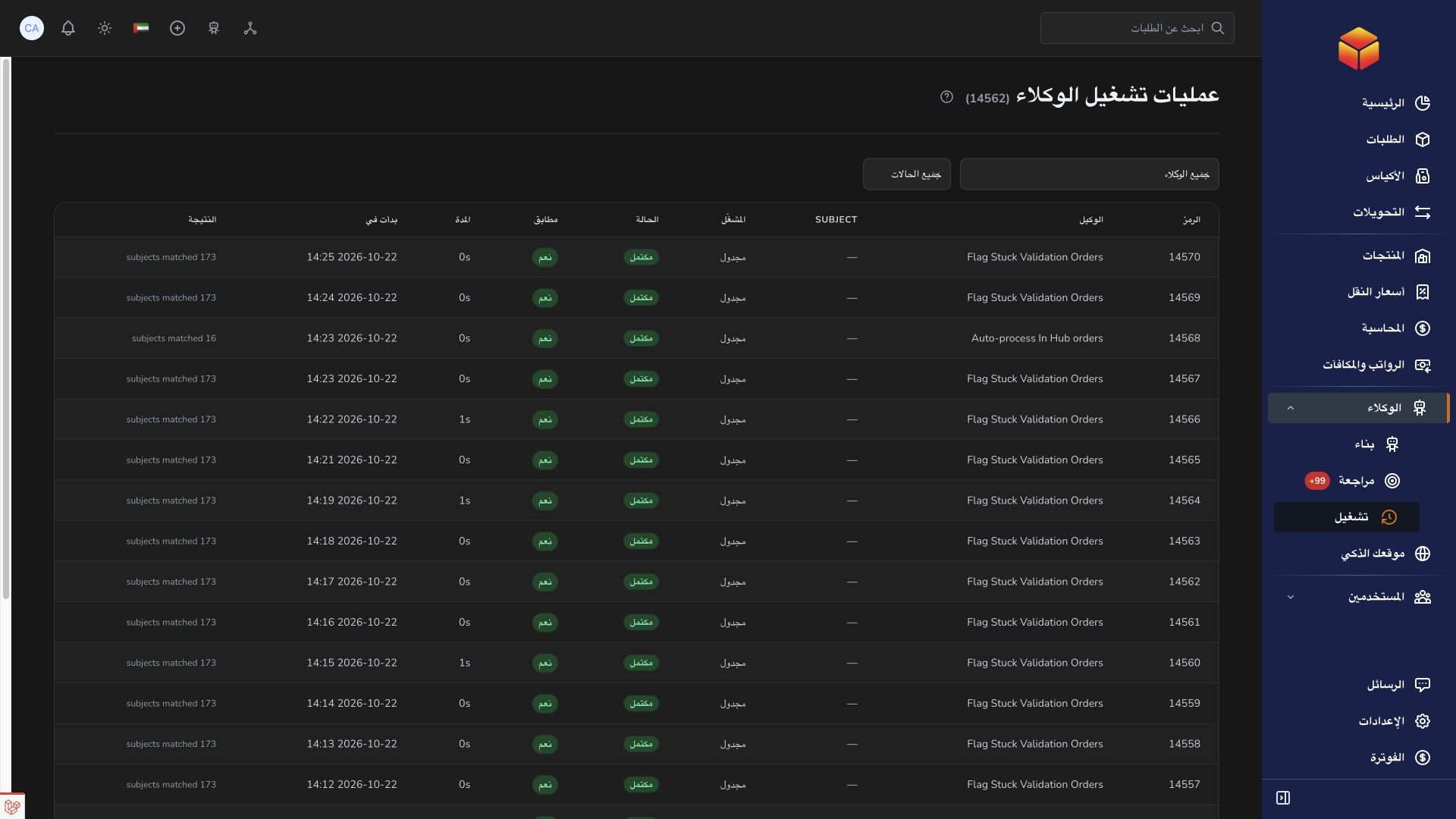
- Open Agent Runs, filter by agent and status and inspect the relevant attempt when a result needs investigation.
Make a decision on current information
Reviews may concern an order, bag, transfer or product. Search supports order references, barcodes and vendor names, bag or transfer codes, and product names or references. Select the agent filter to separate similar suggestions produced by different rules. The All view lets you follow previously processed reviews as well as pending ones.
Compare the proposal with the record's current situation. A transporter may have been assigned or a status changed since the suggestion was created. Check destinations, stock quantities and the complete list of actions, not just the review title. Approving performs the proposed actions; dismissing rejects that proposal without carrying them out.
Use selections and statuses carefully
You can select pending reviews and approve or dismiss them together. Check the selection count and the records covered before using a bulk action, particularly after searching or applying filters. Only group proposals that deserve the same decision.
An executed review means its approved action set completed. A failed review needs investigation; open the relevant record and read the available message instead of approving similar work repeatedly. A pending proposal can also become expired after its allowed review period. Previously approved or executed suggestions are not necessarily recreated every time the same subject matches, so a missing duplicate is not evidence that the agent stopped.
Read run history without assuming a change occurred
Agent Runs offers agent and status filters. Each row shows the trigger, timing, match information and outcome. Where condition details are available, expand the row to see why a condition matched or did not match. Waiting for review points you toward proposals requiring a decision.
Completed means the attempt finished, including previews or checks with no matches. Skipped means that attempt did not proceed, and Failed means something needs attention. Read the result alongside the subject's current page. If failures repeat, disable the agent, check its conditions and actions and contact support with the agent name, subject reference, approximate time and visible message. Keep sensitive customer details out of screenshots unless needed for the case.
Good to know
Run history and review history describe different stages. A recorded match or a pending review is not confirmation that the suggested business change has happened.
Application links
Application links require the appropriate account access. The destination is selected for your signed-in role.